HPRT
HPRT HT500 Desktop Barcode Label Printer – 300 dpi
Couldn't load pickup availability
Need bulk quantities or project pricing? Request a custom quotation.
Share
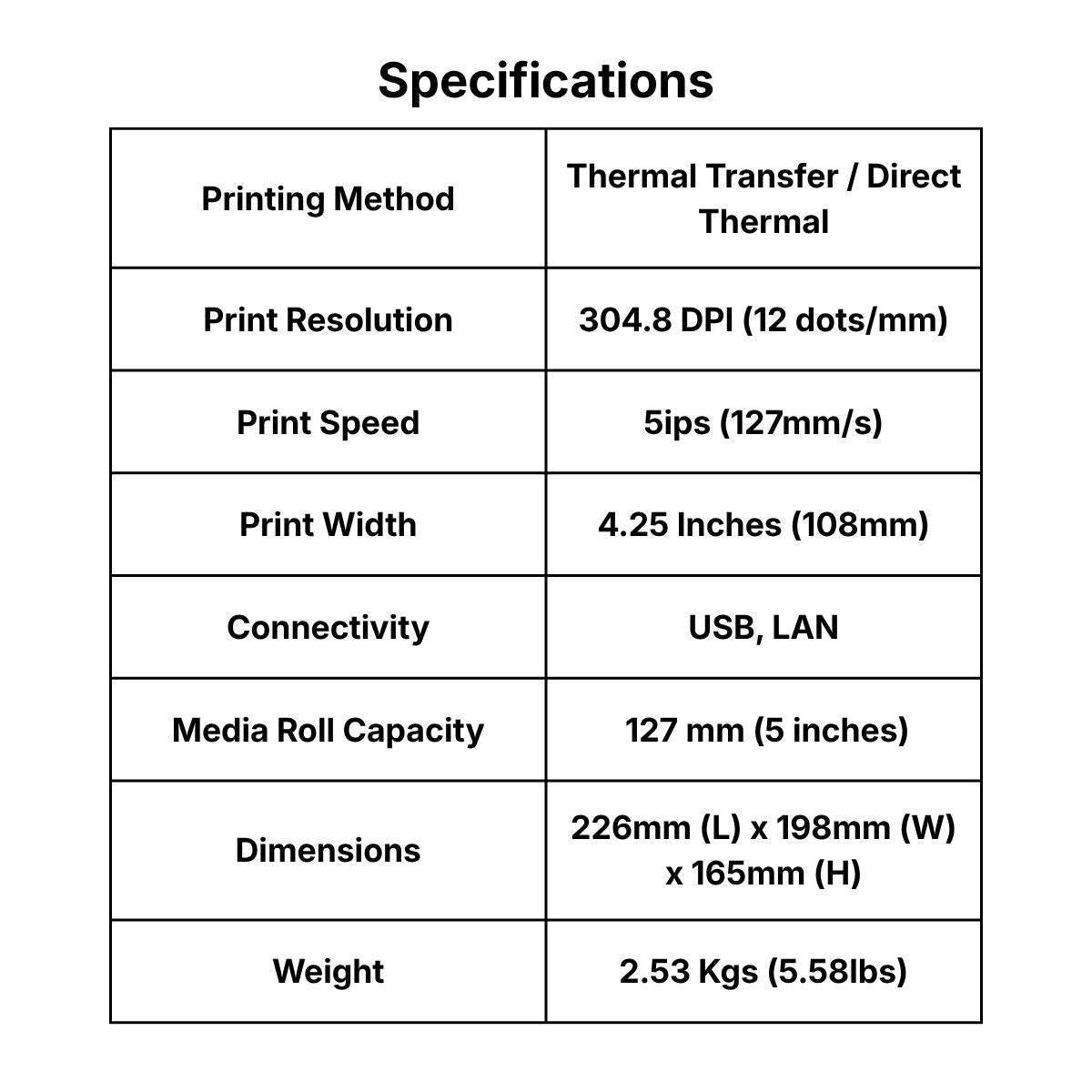
The HPRT HT500 desktop barcode label printer is designed for small-text product and component labels, as well as detailed asset-identification labels. This 300 dpi configuration supports thermal-transfer printing with a documented maximum printing speed of 127 mm/s (5 ips). Its standard interfaces for this exact catalog configuration are USB and Ethernet.
Key benefits
- Verified print profile: 300 dpi output with a documented maximum printing speed of 127 mm/s (5 ips).
- Workflow fit: The desktop format is intended for small-text product and component labels, as well as detailed asset-identification labels.
- Configuration-specific integration: Standard interfaces for this exact catalog configuration are USB and Ethernet.
Best for: Small-text product and component labels, detailed asset-identification labels, retail and inventory barcode labels.
Technical specifications
| Resolution | 300 dpi |
|---|---|
| Maximum Printing Speed | Up to 127 mm/s (5 ips) |
| Standard Interfaces | USB and Ethernet |
| Sensors | Paper-out, gap, ribbon, black-mark and cover-open detection |
| Maximum Media Roll Diameter | 127 mm (5 inches) |
| Printer Languages | ZPL-II, TSPL, DPL and EPL |
Not sure if this printer fits your existing setup or application? Contact TechroDex on WhatsApp and our team can help you check compatibility before you order.

Frequently Asked Questions
What is the difference between desktop, mobile, and industrial barcode printers?
Desktop printers are compact and ideal for low-to-medium volume printing in retail, healthcare, or office environments. Mobile printers are battery-powered for on-the-go labeling in warehouses, delivery routing, or field service. Industrial printers feature rugged enclosures and are built to handle high-volume, continuous 24/7 printing in demanding manufacturing and distribution workflows.
Should I choose a direct thermal or thermal transfer barcode printer?
Direct thermal printers use heat-sensitive paper and require no ink or ribbon, making them a cost-effective choice for short-term applications like standard shipping labels or receipts. Thermal transfer printers use a heated ribbon to melt ink onto the label, producing highly durable, long-lasting barcodes that resist fading, moisture, and chemicals perfect for long-term asset tracking, outdoor use, and inventory management.
Which barcode printer is best for high-volume warehouse and logistics operations?
For high-volume shipping, receiving, and manufacturing work-in-process labels, an industrial barcode printer is the standard choice. These models offer high print speeds (often up to 14 ips), support large media roll diameters to minimize reloading downtime, and feature robust connectivity options like Ethernet and RS-232 for seamless warehouse integration.
Are these barcode printers compatible with my existing POS or inventory software?
Most professional barcode printers support universal printer languages such as ZPL, DPL, EPL, and TSPL. This ensures broad compatibility with major ERP systems, Warehouse Management Systems (WMS), and existing Point of Sale (POS) setups.
Do you provide barcode printer supplies and technical support in the UAE?
Yes, alongside hardware, we supply a complete range of Auto-ID consumables including blank labels, tags, wristbands, and thermal transfer ribbons tailored for businesses across the UAE and Middle East. Our team is available to help check software compatibility, verify print profiles, and ensure your printer matches your exact workflow before you order.